
Authorization Code Flow with Proof Key for Code Exchange (PKCE)
This flow corresponds to the Authorization Code Flow, extended by a security component, described in the RFC7636.
The Problem PKCE Solves: An attacker who intercepts the authorization code could exchange it for tokens. With PKCE, the code can only be exchanged together with the code verifier, which never leaves the client. Public clients (like mobile apps or single-page applications) can’t securely store a client secret, so they must use PKCE.
How PKCE Works:
- Code Verifier: The client generates a random, cryptographically secure string
- Code Challenge: The client creates a hashed version of the code verifier
- Authorization Request: The client sends the code challenge to the authorization server and keeps the verifier
- Token Exchange: When exchanging the authorization code for tokens, the client must provide the original code verifier
- Verification: The server verifies that the code verifier matches the previously sent code challenge
It needs to be started in a web browser since the flow will redirect requests several times to the ezeep or even external ID providers that implement some interactive web application.
Starting Point of Authorization Flow
Client generates a random code_verifier string and calculates the code_challenge value by using the SHA256 hashing algorithm.
To initiate the authentication the application has to start at the /oauth/authorize/ page with the following query parameters:
| Attribute | Type | required | description |
|---|---|---|---|
response_type |
string | Yes | defines the OAuth2 grant, needs to be code
|
client_id |
string | Yes | the Client ID you received from ezeep |
redirect_uri |
string | Yes | Must match one of the redirect URIs you provided when you requested your Client ID (URL-encoded) |
code_challenge |
string | Yes | A cryptographically derived value from the code_verifier that’s sent to the authorization server |
code_challenge_method |
string | Yes | Specifies how the code_challenge was derived from the code_verifier, set to ‘S256’ |
social |
string | No |
azure to automatically redirect to Microsoft for authentication |
prompt |
string | No |
none: neither ezeep nor Microsoft shows a login prompt if a user session already exists, see Implicit login for Azure AAD based accounts
|
scope |
string | No |
printing (space separated scope list) |
state |
string | No | can be used to maintain state after redirecting the user agent |
Finally the web browser will be redirected to the redirect URL (needs to be registered along the client ID at ezeep):
<your redirect_uri>?code=<authorization_code>&state=<state>
Example:
https://account.ezeep.com/oauth/authorize/?response_type=code&client_id=<client_id>&redirect_uri=https%3A%2F%2Fwww.example.com%2Fcallback&scope=printing&state=8b1a59d6af933215414d332b1dabb095&code_challenge=b844nDSnoL45VVqLCq8D1tCbmy7beAS3bYiREsCPnzs&code_challenge_method=S256
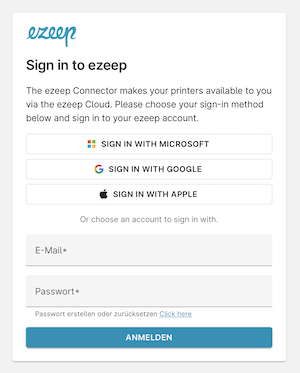
If you are not already signed in to your ezeep account you will be asked to sign in.
After successful authentication you will be redirected to the relevant url with the authorization code as a url parameter.
Example URL finally redirected to:
shell
https://www.example.com/callback?code=UWvSbESYQ2SirrvPCoasSRVYK6jDDD&state=8b1a59d6af933215414d332b1dabb095
Request Access Token
Now that you have an Authorization Code, you must exchange it for tokens. Using the extracted Authorization Code (code) from the previous step. For all following requests mentioned in this article you will need an Authorization HTTP(S) header value.
POST https://account.ezeep.com/oauth/access_token/
Supported attributes:
| Attribute | Type | Required | Description |
|---|---|---|---|
Authorization |
HTTP Header | yes | Basic {{base_64_encoded_client_id}} |
Content-Type |
HTTP Header | yes | application/x-www-form-urlencoded |
grant_type |
string | yes | authorization_code |
scope |
string | no |
printing reporting (space separated scope list); can only narrow the granted scopes |
code |
string | yes | code passed to call to redirect URL |
redirect_uri |
string | yes | <your redirect_uri> |
code_verifier |
string | yes | The initially created code_verifier string |
If successful, returns HTTP status code 200 OK and the following
response attributes:
| Attribute | Type | Description |
|---|---|---|
access_token |
string | the access token that is required in Authorization header of API requests |
token_type |
string | for ezeep always “Bearer”, has to be passed in Authorization header |
expires_in |
int | validity time in seconds of the access token |
scope |
string | scope(s) of token |
refresh_token |
string | [optionally] refresh token, to be used for getting a new access token |
Example Request
curl  -X POST "https://account.ezeep.com/oauth/access_token/" \
      --header "Authorization: Basic <base64_encoded_client_id>" \
      --header "Content-Type: application/x-www-form-urlencoded" \
      --data "grant_type=authorization_code" \
      --data "scope=printing reporting" \
      --data "code=<authorization_code>" \
      --data-urlencode "redirect_uri=https://www.example.com/callback" \
      --data "code_verifier=<your code_verifier>"
Example Response
{
  "access_token": "eyJ0eXAiO...",
  "token_type": "Bearer",
  "expires_in": 3600,
  "scope": "printing reporting",
  "refresh_token": "erliDdAb..."
}
The access_token will be valid for 3600 seconds (i.e. 1 hour) and after that duration you have to request new access token using the refresh token that you received in the access token response.
Use Refresh Token
You can use the refresh_token to get a new access_token. Reuse the access token until it expires; do not request a new access token for every API call. Rate limiting may be applied to this endpoint.
Revoke the refresh token when your application no longer needs it, see Token Revocation.
To refresh your token, send a POST request to /oauth/access_token/ with grant_type=refresh_token.
curl -X POST https://account.ezeep.com/oauth/access_token/
Supported attributes:
| Attribute | Parameter Type | Required | Description |
|---|---|---|---|
Authorization |
HTTP Header | yes | Basic {{base_64_encoded_client_id}} |
Content-Type |
HTTP Header | yes | application/x-www-form-urlencoded |
grant_type |
string | yes | refresh_token |
scope |
string | no |
printing reporting (space separated scope list); can only narrow the granted scopes |
refresh_token |
string | yes | refresh_token obtained by last (token rotation) call to /oauth/access_token/ |
If successful, returns HTTP status code 200 OK and the following
response attributes:
| Attribute | Type | Description |
|---|---|---|
access_token |
string | the access token that is required in Authorization header of API requests |
token_type |
string | for ezeep always “Bearer”, has to be passed in Authorization header |
expires_in |
int | validity time in seconds of the access token |
scope |
string | scope(s) of token |
refresh_token |
string | refresh token, to be used for getting a new access token |
Example Request
curl -X POST "https://account.ezeep.com/oauth/access_token/" \
     --header "Authorization: Basic <base64_encoded_client_id>" \
     --header "Content-Type: application/x-www-form-urlencoded" \
     --data "grant_type=refresh_token" \
     --data "scope=printing reporting" \
     --data "refresh_token=qX5HTLt4..."
Example Response
{
  "access_token": "eyJ0eXAiOiJ...",
  "token_type": "Bearer",
  "expires_in": 3600,
  "scope": "printing reporting",
  "refresh_token": "vT5GTKk8..."
}
You will need to replace and store the new refresh token securely from the response for future usage.
Example bash script
#!/bin/bash
# Configuration - Update these values for your setup
BASE_URL="https://account.ezeep.com"
CLIENT_ID="<client_id>"
CLIENT_SECRET=""  # Only needed for confidential clients
REDIRECT_URI="https://www.example.com/callback"
SCOPE="printing"

# Generate PKCE parameters
CODE_VERIFIER=$(openssl rand -base64 48 | tr '+/' '-_' | tr -d '=\n' | cut -c1-64)
CODE_CHALLENGE=$(printf '%s' "$CODE_VERIFIER" | openssl dgst -sha256 -binary | base64 | tr '+/' '-_' | tr -d '=\n')
CODE_CHALLENGE_METHOD="S256"

# Generate random state parameter
STATE=$(openssl rand -hex 16)
echo "=== OAuth 2.0 Authorization Code Flow with PKCE ==="
echo "Code Verifier: $CODE_VERIFIER"
echo "Code Challenge: $CODE_CHALLENGE"
echo "State: $STATE"
echo ""

# Step 1: Authorization Request (this will redirect to login page)
AUTH_URL="${BASE_URL}/oauth/authorize/?response_type=code&client_id=${CLIENT_ID}&redirect_uri=${REDIRECT_URI}&scope=${SCOPE}&state=${STATE}&code_challenge=${CODE_CHALLENGE}&code_challenge_method=${CODE_CHALLENGE_METHOD}"
echo "Step 1: Open this URL in your browser to authorize:"
echo "$AUTH_URL"
echo ""
echo "After authorization, you'll be redirected to:"
echo "${REDIRECT_URI}?code=AUTHORIZATION_CODE&state=${STATE}"
echo ""

# Wait for user to provide the authorization code
read -p "Enter the authorization code from the callback URL: " AUTHORIZATION_CODE

echo ""
echo "Step 2: Exchange authorization code for access token"

# Step 2: Token Request
TOKEN_RESPONSE=$(curl -s -X POST "${BASE_URL}/oauth/access_token/" \
                      -H "Content-Type: application/x-www-form-urlencoded" \
                      -H "Authorization: Basic $(printf '%s' "${CLIENT_ID}:${CLIENT_SECRET}" | base64 | tr -d '\n')" \
                      -d "grant_type=authorization_code" \
                      -d "code=${AUTHORIZATION_CODE}" \
                      --data-urlencode "redirect_uri=${REDIRECT_URI}" \
                      -d "code_verifier=${CODE_VERIFIER}")

echo "Token Response:"
echo "$TOKEN_RESPONSE" | jq . 2>/dev/null || echo "$TOKEN_RESPONSE"
echo ""

# Extract access token for further use
ACCESS_TOKEN=$(echo "$TOKEN_RESPONSE" | jq -r '.access_token // empty' 2>/dev/null)

if [ ! -z "$ACCESS_TOKEN" ]; then
  echo "Step 3: Test API call with access token"

  # Test with user info endpoint (if available)
  USER_INFO=$(curl -s -H "Authorization: Bearer $ACCESS_TOKEN" "${BASE_URL}/oidc/user_info/")
  echo "User Info Response:"
  echo "$USER_INFO" | jq . 2>/dev/null || echo "$USER_INFO"
else
  echo "Failed to obtain access token. Check the response above for errors."
fi