- Preconditions
- Base URL
- Project Resources
- Connectors Resources
- Drivers Resources
- Groups Resources
- Users Resources
- Assignments Resources
- Webhooks resources
- Step-by-Step
REST API Resources
Preconditions
To get access to the API, given client credential can be used for authorization.
Client_ID : <client_id>
Redirect_URI : a redirect URI registered for your client
We use the OAuth2 client credentials grant to let clients authorize against a set of protected resources (e.g., organizations) that are under control of your client.
You must ensure client credentials are kept secret and not used by an application that is incapable of maintaining their confidentiality.
More information can be found in the OAuth2 RFC 6749.
Base URL
https://api2.ezeep.com/
https://account.ezeep.com/v1/
https://account.ezeep.com/partner/v1/
Paths in the tables below are relative to https://api2.ezeep.com/ unless a full URL is given.
Project Resources
| Resource | Available endpoints |
|---|---|
| Connectors | /printing/v1/connectors/ |
| Drivers | /printing/v1/drivers/ |
| Groups | /printing/v1/groups/ |
| Users | https://account.ezeep.com/v1/users/ |
| Printers | /printing/v1/printers/ |
| Assignments | /printing/v1/assignments/ |
| Organizations | https://account.ezeep.com/partner/v1/organizations/ |
| Members | https://account.ezeep.com/partner/v1/organizations/ |
| Memberships | https://account.ezeep.com/partner/v1/users/ |
| Webhooks | /webhooks/ |
Connectors Resources
| Resource | Available endpoints |
|---|---|
| List connector types | /printing/v1/filter_values/connector/ |
| List connectors | /printing/v1/connectors/ |
| List ezeep Hub connectors | /printing/v1/connectors/?type=TPHub |
| List printers of a connector | /printing/v1/printers/?connector_id= |
| Delete a connector | /printing/v1/connectors/ |
Drivers Resources
| Resource | Available endpoints |
|---|---|
| List vendors | /printing/v1/drivers/vendors/ |
| List drivers of a vendor | /printing/v1/drivers/?vendor= |
| Assign a driver to a printer | /printing/v1/printers/ |
Groups Resources
| Resource | Available endpoints |
|---|---|
| Create a group | /printing/v1/groups/ |
| List groups | /printing/v1/groups/ |
| Get a group | /printing/v1/groups/ |
| Update a group | /printing/v1/groups/ |
| Delete a group | /printing/v1/groups/ |
| Add a user to groups | /printing/v1/users/ |
| Remove a user from a group | /printing/v1/users/ |
| Get the groups of a user | /printing/v1/users/ |
Users Resources
| Resource | Available endpoints |
|---|---|
| List users | https://account.ezeep.com/v1/users/ |
| Get a user | https://account.ezeep.com/v1/users/ |
| Update a user | https://account.ezeep.com/v1/users/ |
| Delete a user | https://account.ezeep.com/v1/users/ |
| Invite a user | https://account.ezeep.com/v1/userinvitations/ |
| List invitations | https://account.ezeep.com/v1/userinvitations/ |
| Resend an invitation | https://account.ezeep.com/v1/userinvitations/ |
| List printing settings of all users | /printing/v1/users/ |
Assignments Resources
| Resource | Available endpoints |
|---|---|
| List printers with their assignments | /printing/v1/assignments/ |
| List printers assigned to a group | /printing/v1/assignments/?group= |
| Assign a printer to groups | /printing/v1/assignments/ |
| Remove a printer from a group | /printing/v1/assignments/ |
| List printers available to a user | /printing/v1/assignments/?group= |
Webhooks resources
| Resource | Available endpoints |
|---|---|
| Add an endpoint | /webhooks/endpoints |
| Update an endpoint | /webhooks/endpoints/ |
| Delete an endpoint | /webhooks/endpoints/ |
| Get an endpoint | /webhooks/endpoints/ |
| List endpoints | /webhooks/endpoints |
| Test an endpoint | /webhooks/endpoints/test |
| List failed endpoint events | /webhooks/endpoints/ |
| Get a failed endpoint event | /webhooks/endpoints/ |
| Delete a failed endpoint event | /webhooks/endpoints/ |
| Delete all failed endpoint events | /webhooks/endpoints/ |
| Retry a failed endpoint event | /webhooks/endpoints/ |
| Retry all failed endpoint events | /webhooks/endpoints/ |
| Get retry all operation | /webhooks/endpoints/ |
| Cancel retry all operation | /webhooks/endpoints/ |
| Update data protection settings | /webhooks/settings |
| Get data protection settings | /webhooks/settings |
Step-by-Step
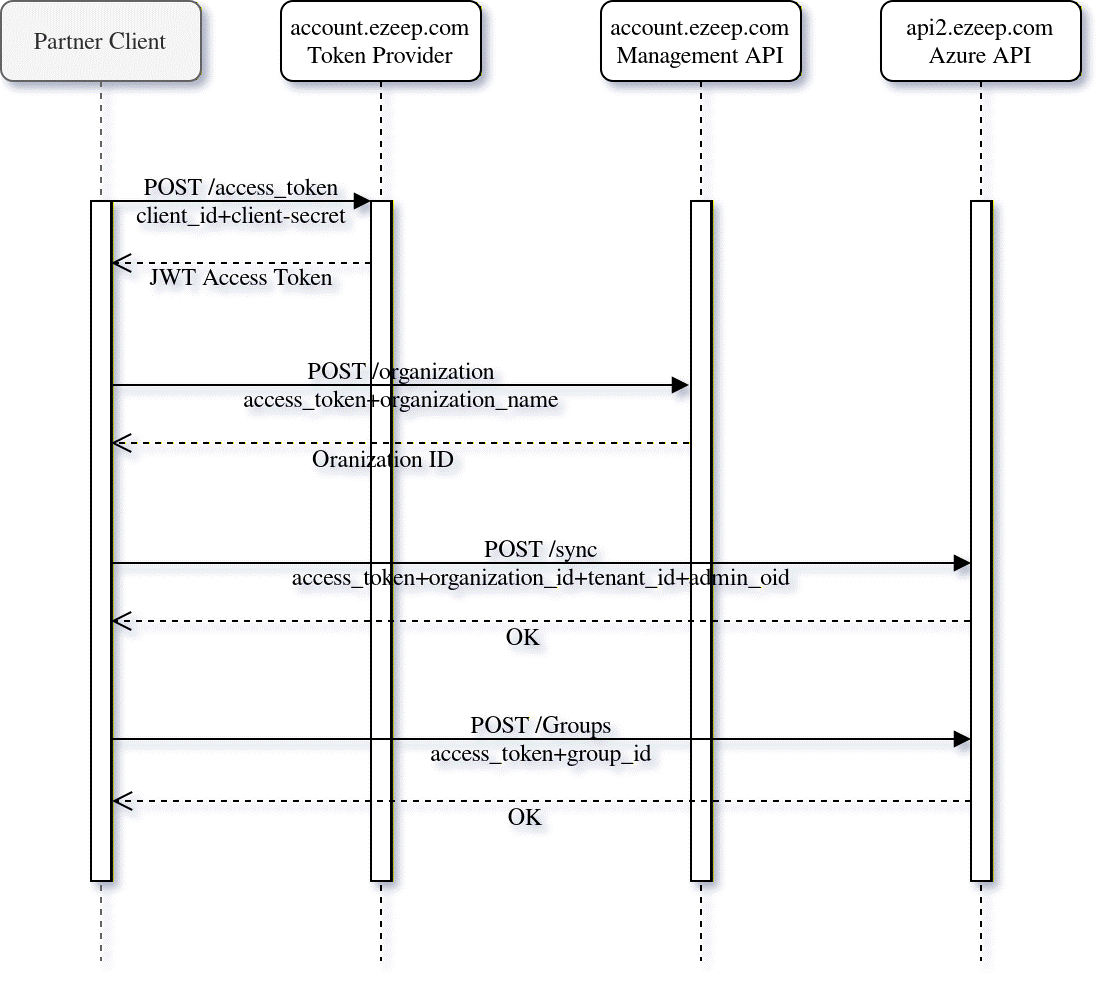
The following describes the procedure of using the ezeep REST API to create an organization, activate an azure connection, import azure groups to ezeep to allow printing, and eventually delete the organization.